
Is Visualizing Algorithms in Memory possible ?
Ever tried to understand how algorithms work and ended up staring at your textbook, hoping for some divine intervention? Well, I did too. That's why I built this Algorithm Visualizer—a web app that lets you actually see algorithms in action, instead of just imagining them in your head (which, let's be honest, is not always easy).
Project Overview
This project is my attempt to make learning algorithms less painful and a lot more interactive. The app is built using React for the frontend, Nest.js for the backend, and Three.js for all the cool visualizations. If you like clicking buttons and watching things move, you’ll love this.
Folder Structure
Just so you don’t get lost in the code jungle, here’s how things are organized:
algorithm-vizualizer-main/
├── apps/
│   ├── backend/                    // NestJS application + Postgres database
│   │   ├── src/
│   │   │   ├── algorithms/         // Algorithm implementations
│   │   │   ├── controllers/        // API route handlers
│   │   │   ├── services/           // Business logic
│   │   │   ├── entities/           // Database models
│   │   │   └── main.ts             // Application entry point
│   │   ├── package.json
│   │   └── tsconfig.json
│   │
│   └── web/                        // ReactJS + R3F for frontend
│       ├── src/
│       │   ├── components/
│       │   │   ├── AlgorithmSelector/
│       │   │   ├── Visualizer/     // Three.js visualization components
│       │   │   ├── Controls/       // Speed, input controls
│       │   │   └── UI/             // Common UI components
│       │   ├── hooks/              // Custom React hooks
│       │   ├── services/           // API calls
│       │   ├── utils/              // Helper functions
│       │   ├── types/              // TypeScript types
│       │   └── App.tsx
│       ├── public/
│       ├── package.json
│       └── vite.config.ts
│
├── packages/                       // Shared packages
│   └── shared/                     // Common types and utilities
│       ├── types/
│       └── constants/
│
├── package.json                    // Root package.json (workspace)
├── turbo.json                      // Turborepo configuration
└── README.md
Features
- Visualizes popular algorithms (sorting, searching, pathfinding)
- Interactive controls for speed, input size, and algorithm selection
- Step-by-step execution with animations (no magic, just code)
- Responsive design (works on your phone, tablet, or that ancient laptop)
How Does It Work?
1. The User Interface
When you open the app, you’ll see:
- Algorithm Selector: Pick your favourite algorithm (or the one your professor assigned)
- Input Controls: Set array size, speed, and other parameters. No need to break your head over input formats.
- Visualization Canvas: The main stage where all the drama unfolds
- Step Controls: Play, pause, step forward/backward—like Netflix, but for algorithms
2. Visualization Logic
Three.js handles the visuals. For sorting, each array element is a bar. When two bars swap, you’ll see them dance (okay, just move, but you get the idea). For searching, the current element is highlighted, so you know exactly what’s happening.
3. Algorithms Implemented
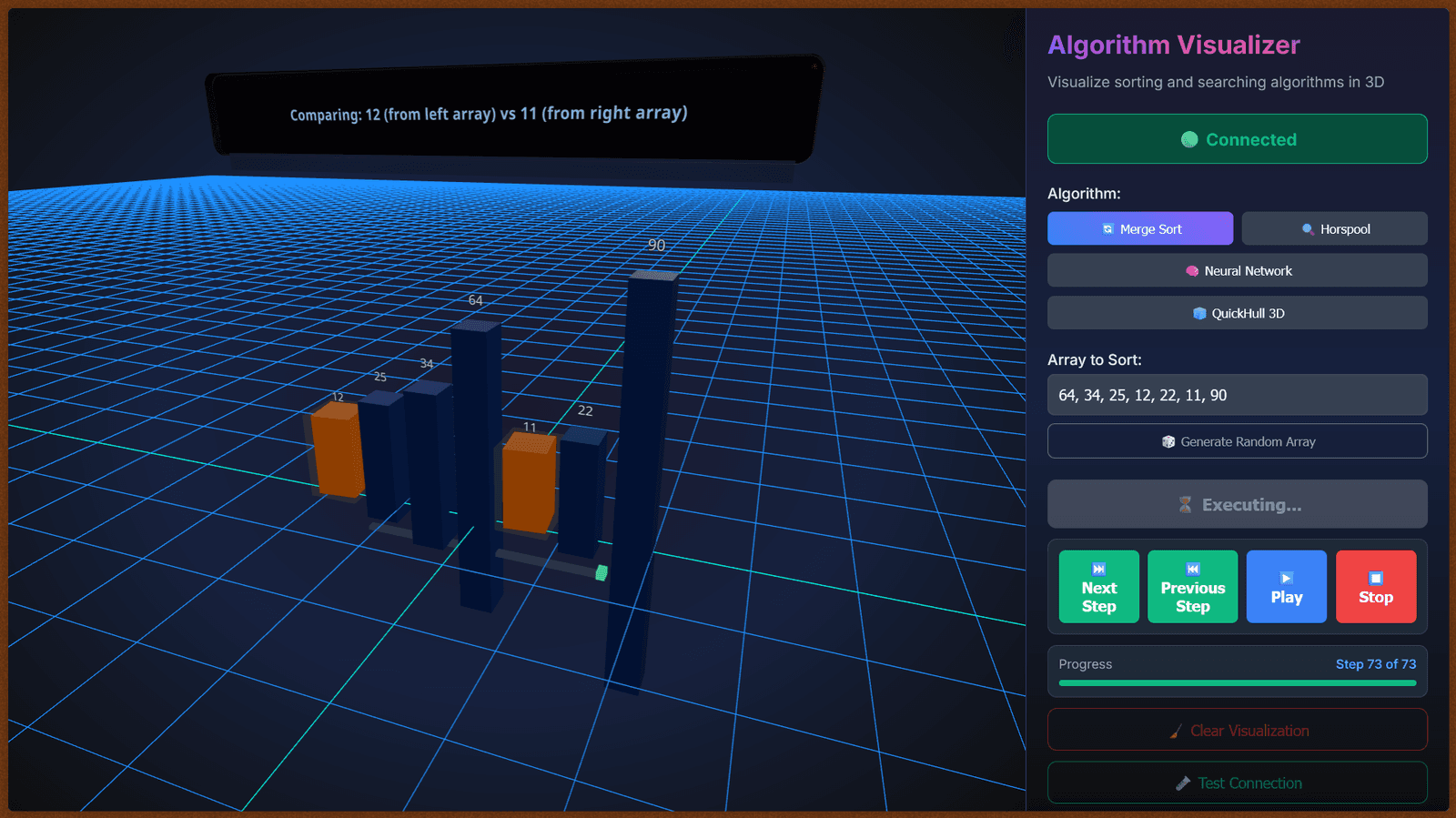
- Merge Sort: Divide and conquer. Splits the array, sorts, and merges. Like group projects—split the work, then combine (hopefully without chaos). Screenshot: Merge Sort Visualization
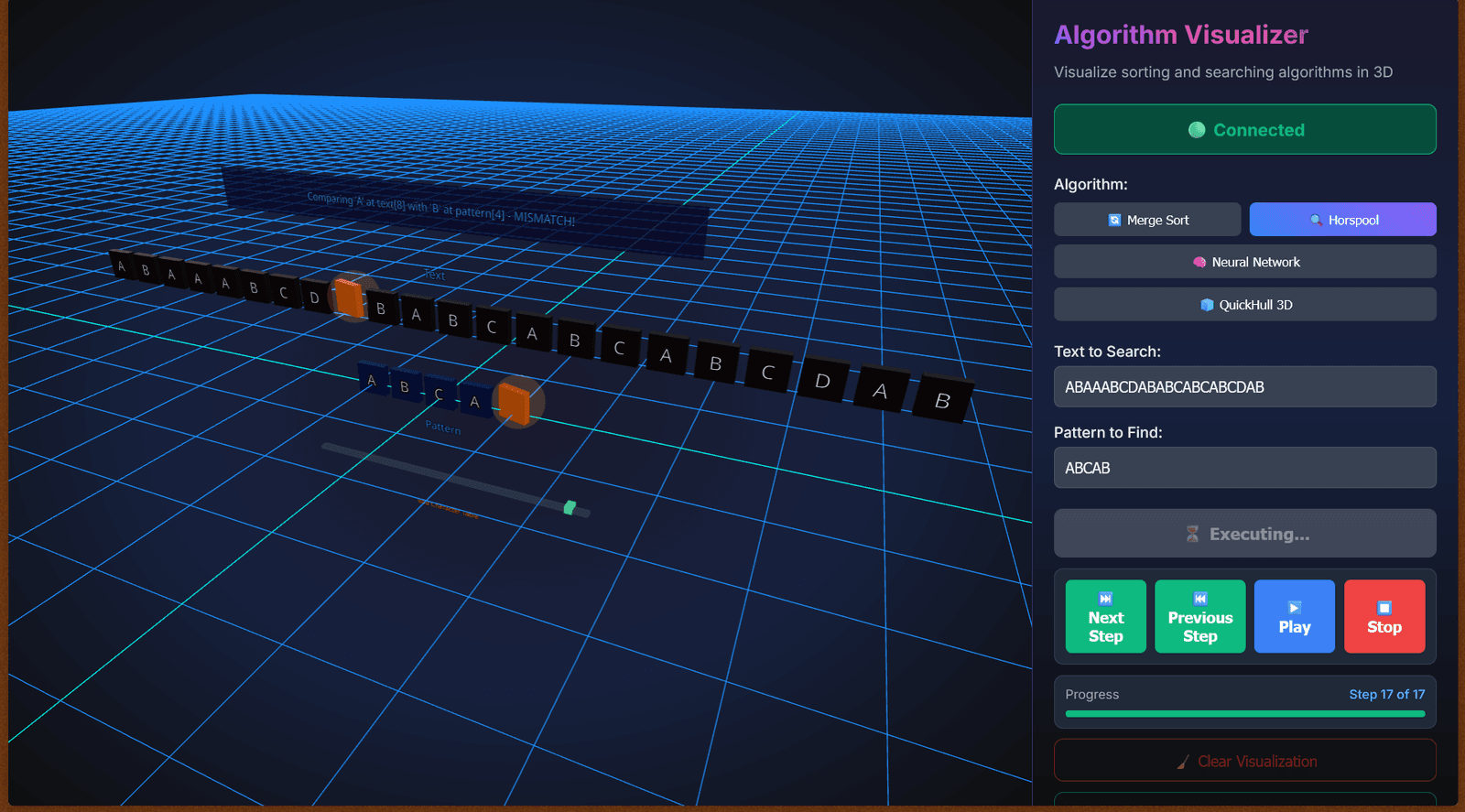
- Horspool's Algorithm: Efficient string matching algorithm that skips unnecessary comparisons, making it faster than naive approaches.
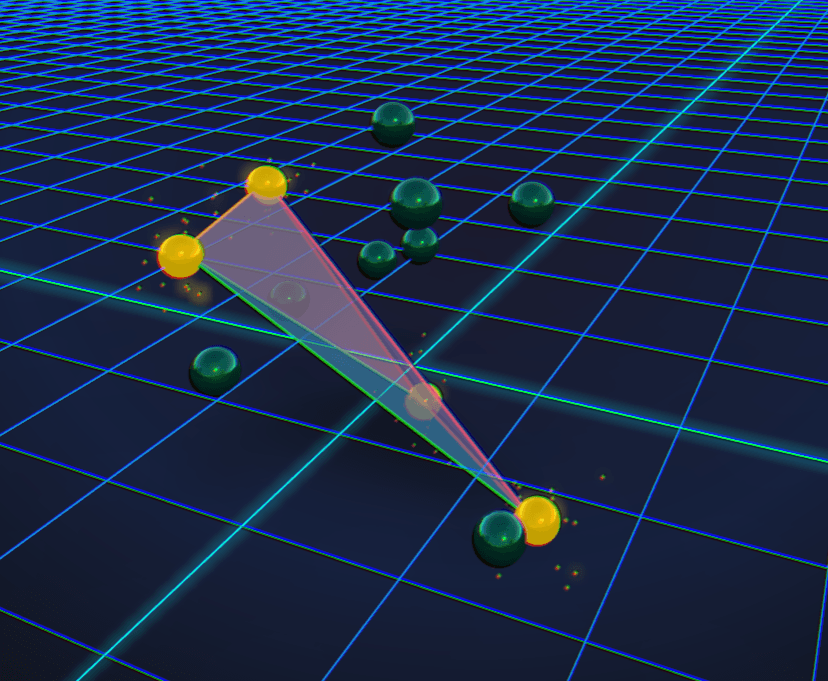
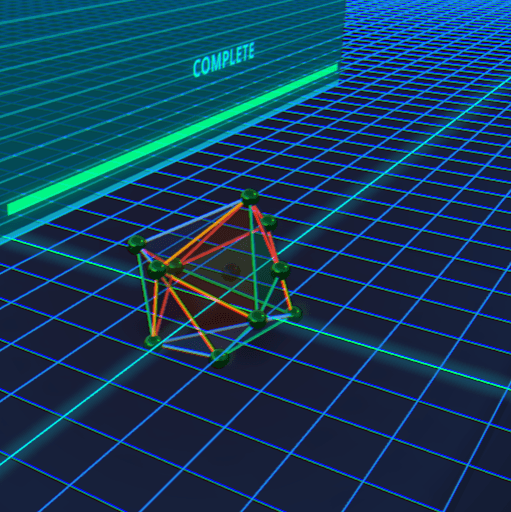
- QuickHull's Algorithm: A divide-and-conquer algorithm for finding the convex hull of a set of points. It's like wrapping a rubber band around the outermost points.
- Neural Network Iris Classification: A simple neural network model to classify iris flowers based on their features. It's like teaching a computer to recognize different types of flowers.
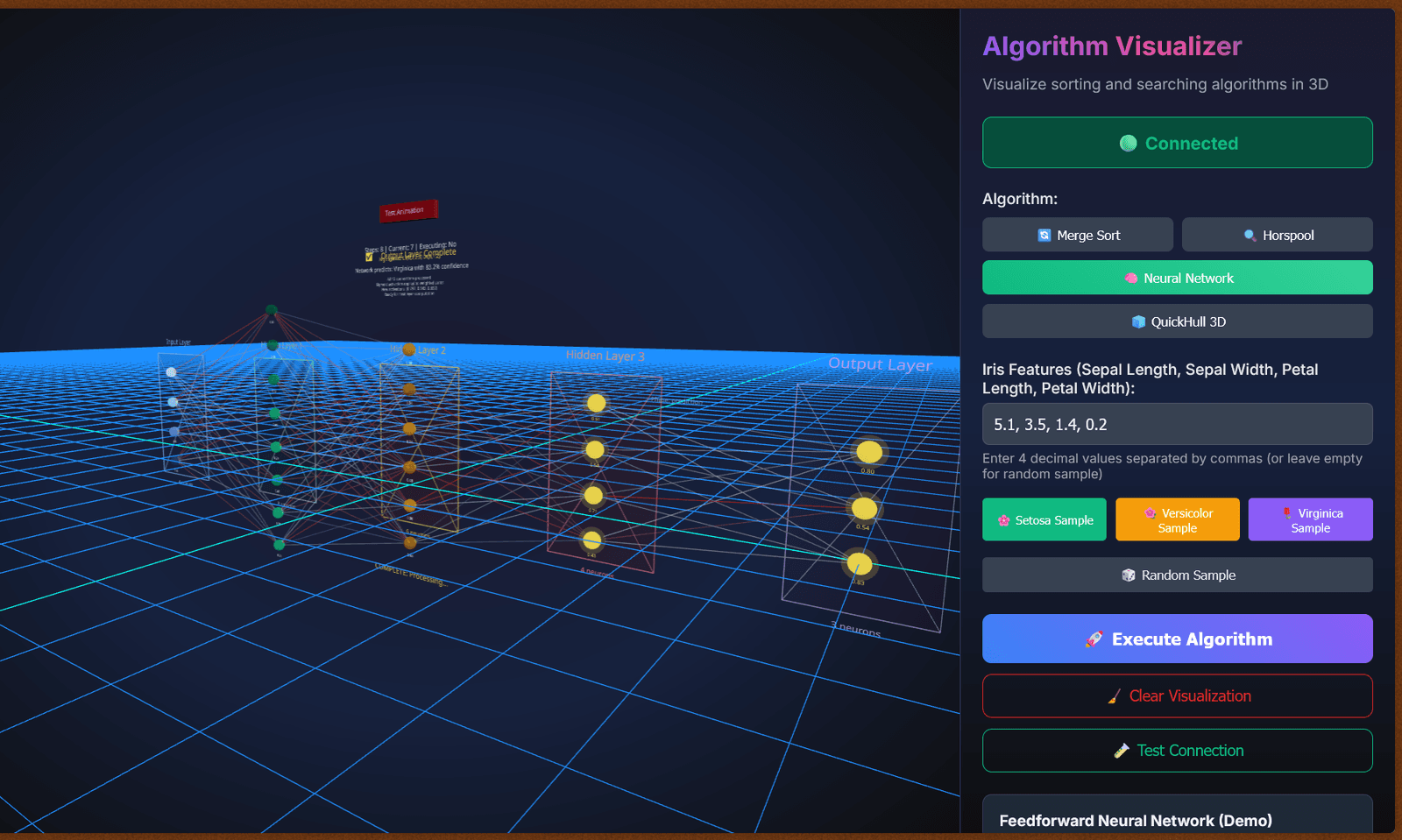
Note that the neural network is very slow right now on my system as I do not have a graphics card and my processor is very slow. I will try to optimize it later when I buy a new system with a better GPU.
4. Backend API
The backend is built with NestJS framework from the ground up, I am using websockets for real-time communication between the frontend and backend. I thought about using Express, but NestJS gives me more structure and scalability. The biggest challenge i faced here was setting up the WebSocket communication and ensuring smooth data flow between the frontend and backend. It took some trial and error, but now it works like a charm. I love how NestJS makes it easy to create modular and maintainable code.
So the main idea is, i have created something called "Execution context" in the backend which is basically a data structure that stores the instructions for each algorithm, each algorithm has a different execution context. When I was architecting this, I thought to myself, "How can I make it easy to add new algorithms in the future?" So I designed the execution context to be flexible and extensible. This way, if I want to add a new algorithm, I just need to create a new execution context for it and implement the necessary logic. But then I thought, instead of us manually adding this, can we integrate our backend with a LLM and do it ?? It would be so cool if we could just type "Add a new sorting algorithm" and the backend would automatically generate the execution context and logic for it. I haven't implemented this yet, but it's on my wishlist. If you are interested in contributing to this, feel free to reach out!
So when the user executes a algorithm, i am executing the algo on the backend and storing each instruction's context and that is abstracted into one whole execution context. This allows the frontend to request the current state of the algorithm and visualize it step by step. The backend handles all the heavy lifting, so the frontend can focus on showing you the pretty animations. So even if the frontend is slow, it doesn't matter cause i designed this to be such that the backend sends back the next instruction's context only when the frontend completes the current step. This way, the frontend can take its time to render the animations without missing any steps.
How to Use
- Select an Algorithm from the dropdown.
- Adjust Input Parameters (array size, speed, etc.).
- Click 'Visualize' and watch the magic happen.
- Use Step Controls to pause, play, or step through the algorithm. No need to rush—algorithms aren’t going anywhere.
Challenges Faced
- Animating Steps: Figuring out how to show each step visually was tricky. Sometimes the bars just refused to move (like me on Monday mornings).
- Managing State: Keeping track of the current step and updating the UI without breaking things took some trial and error.
- Responsive Design: Making sure everything looks good on all devices—because not everyone has a fancy monitor.
Future Plans
- Add more algorithms (dynamic programming, graph stuff, etc.)
- Make the UI even smoother
- User authentication so you can save your progress (and show off to friends)
Conclusion
Building this project taught me a lot about both coding and how algorithms really work. If you’re a student struggling with algorithms, I hope this visualizer makes things clearer (and maybe a bit more fun). If you have ideas or want to contribute, let me know!
Made with lots of love and passion for computers, yours truly - Taha Sindoli